ComfyUI Official | LTX-2 Image and Video Workflow Demo
From text and images to audio-visual generation, observe how the workflow connects the creative steps.

Start with one workflow. Build from real results.
We help teams of roughly 10–50 people plan practical AI workflows for sales research, company documents, content production, and website monitoring.
From text and images to audio-visual generation, observe how the workflow connects the creative steps.
Understand the model settings and tool operation concepts of the "Lobster" agent.
The above is a public technical demonstration by the official publisher and is not a product of DFocus or a performance guarantee of this solution. The video is played from YouTube; if your browser blocks the embedded content, you can open it from the original video.
By connecting materials, instructions, models, and output steps, DFocus eliminates the need to restructure the process from scratch for each event. DFocus can plan ComfyUI image and video workflows based on a company's product and brand materials and review methods.

View workflow operation interfaceDiscuss the content and processes that businesses can import first.
It's not about just installing chat tools, nor is it necessary to build a company-wide system all at once. First, use a single department's actual tasks to verify the time savings and delivery quality.
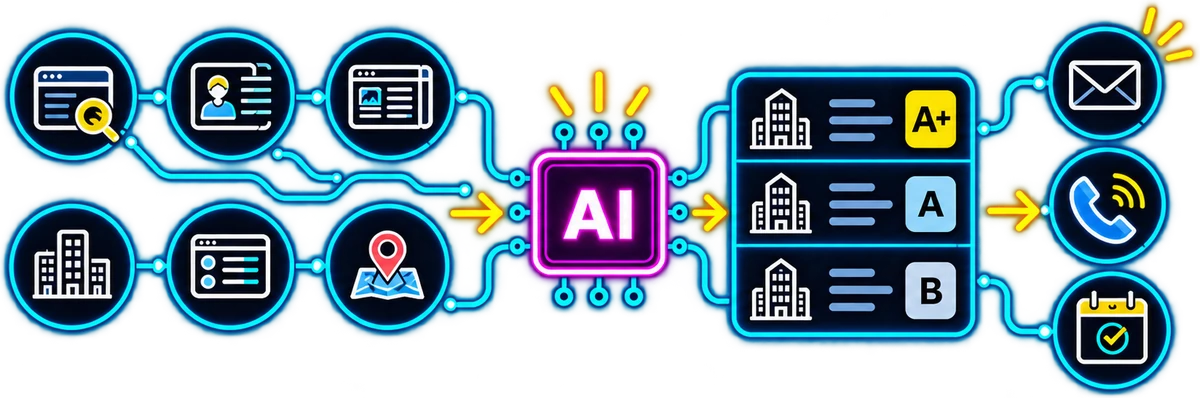
DFocus Prospect Hunter is an AI business development system in development for researching potential clients, building prospect lists and organizing opportunity follow-up. It can also be scoped as an AI cold prospecting system: the workflow reviews recent public business signals, checks source and company information, then connects research to company records, opportunities and next-step tasks.
It is intended for small businesses, studios and sales teams with a clear service and customer segment but limited time for new-client research. Start with one service and one target group, then evaluate a scoped pilot. Finding a company, confirming a need and receiving a reply are separate steps.
When a publication date is available, research prioritizes signals from roughly the past seven days; information from the prior 30 days may be kept as supporting context. Original sources and company details are checked where available. A public signal is not confirmed buying intent. End-to-end validation is ongoing, and public SaaS subscriptions are not available.
Project-based pilots can be discussed while validation continues. AI team chat and public SaaS subscriptions are not live. See the Prospect Hunter page for use cases, review criteria and current implementation status.
Explore client prospecting and lead research Review implementation status Compare freelance platforms and AI prospecting
Organize potential needs from authorized sources, categorize leads, prepare draft inquiries, record responses and follow-up reminders, allowing the business to focus its time on effective communication. All outbound mailings and commitments must first be approved by a person.
Organize meeting minutes, requirements, and reference materials into a draft plan, work breakdown, risk list, and progress summary. The person in charge confirms the valuation, timeline, and client commitments, and retains records of the sources of the information.
In the testing environment, assist with specifications, program suggestions, test organization, and anomaly analysis. Formal deployment and data changes require review; the term "full-time AI engineer" should not be interpreted as an unsupervised technical guarantee.
Retrieve product information, SOPs, forms, and case information from designated folders or knowledge bases, generating traceable summaries or reminders; when unsure, forward the information to the appropriate team members, and do not fabricate answers.
For companies with 10–50 employees, the value of AI is not just in occasionally generating a beautiful image, but in providing a reusable and handoverable content creation process for a small number of marketing, sales, and design staff.
Suitable for: Marketing/design departments of e-commerce companies, brand owners, retail stores, and service industries. Using licensed product photos, brand guidelines, and event requirements as input, the system plans contextual backgrounds, image variations, background removal and retouching, and provides multiple sizes for output. Designers then handle layout, color correction, and finalization.
The benefits include: reducing the time spent finding materials from scratch and redoing designs each time; allowing the same event to be extended to website banners, social media posts, and advertising versions; and making design assets easier to retain and reuse.
The appearance, specifications, text, and trademarks of the products still need to be checked; AI-generated scene images cannot be used to imitate real photos, and the pixel count, size, color, and final artwork requirements for printing output need to be confirmed separately.
Suitable for: Small teams that need product introductions, service tutorials, event previews, or brand short films. First, organize the theme and selling points, then use AI-PM/language models to assist with the script and storyboard. Next, evaluate the use of ComfyUI for image-based videos, text-based videos, or processing of existing materials, and then hand them over to a team member for editing, subtitling, and sound integration.
The benefits include: faster comparison of opening and scenario proposals, allowing a single project to be extended into multiple short films or different formats; and the ability to keep records of generation, review, modification, and release, reducing the cost of relearning during team handoff.
Not every generated video can be used commercially immediately. Character consistency, product details, subtitles, voice-over, music licensing, and platform rules all need to be reviewed; short-form videos generated locally require separate testing of the model, length, resolution, and hardware load.
Activity/product requirements → AI-PM organizes plans and scripts → Ollama or applicable language models assist with text and prompts → ComfyUI generates/processes images or videos → Designer completes drafts and editing → Business review → Publication and performance recording.
The tools each have their own roles: Ollama is primarily responsible for executing the applicable language model; ComfyUI uses nodes to connect image, audio, and video models. The two can be connected as needed, but simply installing Ollama won't automatically generate videos, nor does it mean that all models can run smoothly on the same computer.
First, track the total production time, rejection and rework rate, brand compliance rate, cost per usable finished product, and post-approval release frequency for each piece of usable material. Views, clicks, and inquiries can be tracked using tagged links, without directly equating the number of generated images with revenue or sales performance.
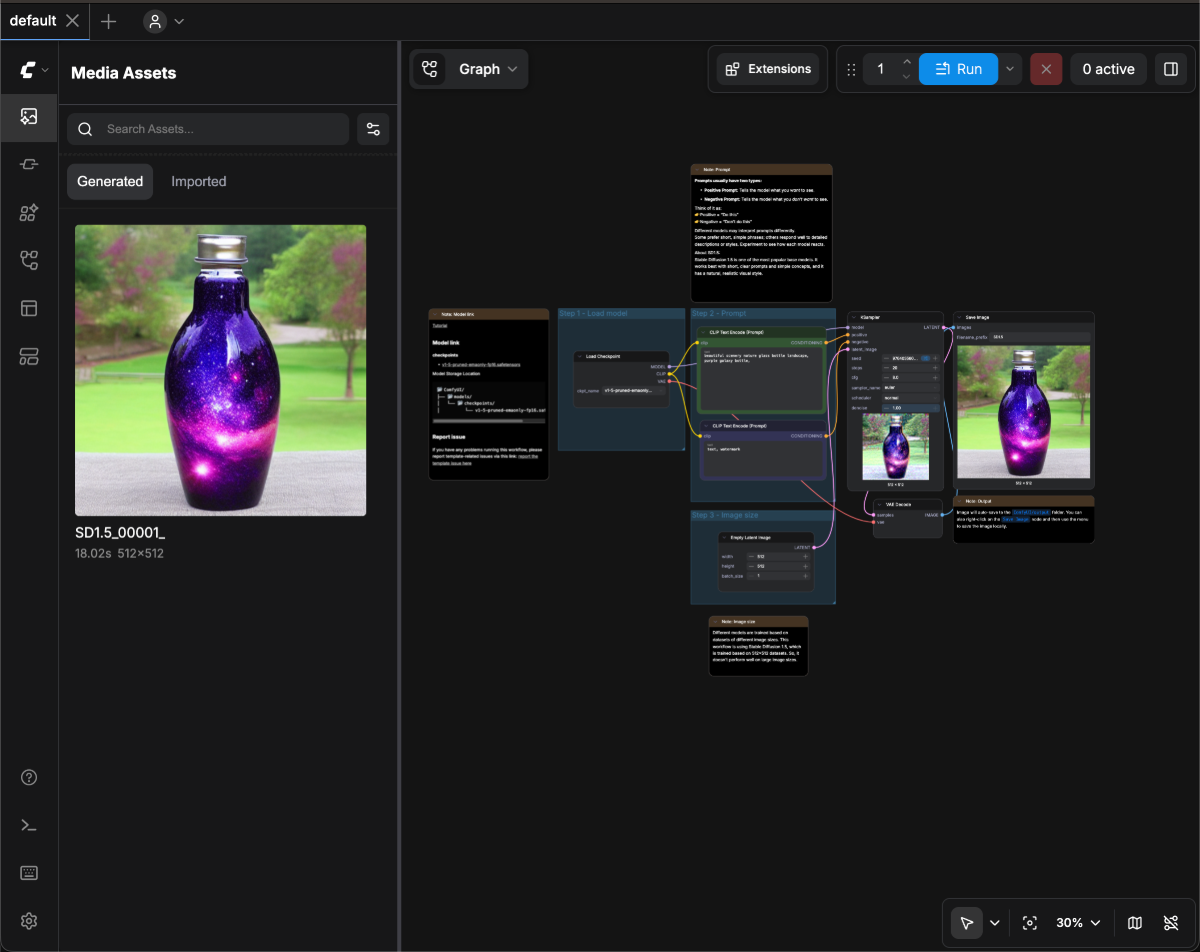
Nodes represent different tasks, and connections represent data transfer. From inputting materials, setting models and instructions, to previewing, saving, and subsequent editing, everything can be combined as needed. Click on the images below to enlarge; the actual interface may vary depending on the version and installed nodes.
Workflow: Text commands → Model and sampling settings → Image preview and save.
It can serve as a starting point for creating community visuals, event scenarios, and proposal sketches. Product details, brand text, and the final commercial draft still require verification and design processing.
This is a screenshot from the official ComfyUI documentation, not a case study delivered to a DFocus customer. View the official tutorial , original images and source, and GPL -3.0 license (original image, unmodified).
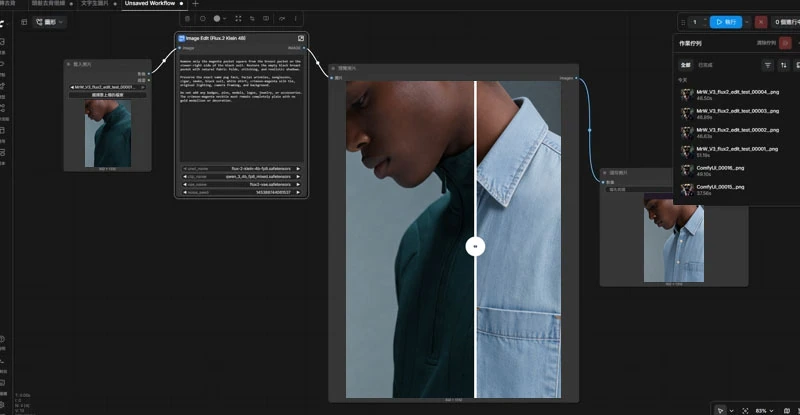
Process: Read image → Editing instructions and model → Compare and preview → Save results.
Using a before-and-after comparison of clothing changes as an example, this illustrates how original materials, modification instructions, and edited results can be viewed in the same workspace. Companies can use authorized materials to evaluate clothing visual proposals, contextual changes, and different versions of the production process; however, product details and brand consistency must still be verified before official use.
User-provided and labeled as official ComfyUI demo screens are used to illustrate the clothing editing process.
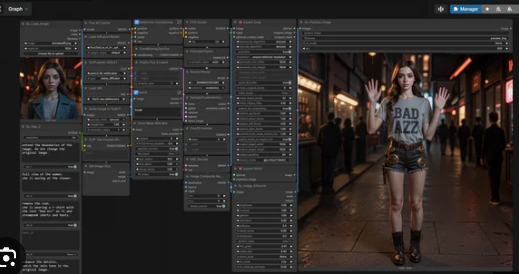
Workflow: Starting image and instructions → Video model and generation settings → Clip preview → Editing, dubbing and subtitles.
It can evaluate the creation of materials for product displays, brand contexts, and event short films. The official LTX-2 provides workflows for generating video from text and images; the model, display memory, video length, and resolution need to be tested according to the actual equipment.
The image on the right is a workflow interface reference provided to users. The original image has limited resolution; you can zoom in to compare the node configurations. See also the ComfyUI official LTX-2 video workflow .
For example, you can first use a set of authorized product materials to create a trial social media image and a short-form video, and then confirm brand consistency, number of revisions, manual review, and actual working hours. DFocus can assist in planning installation, node connection, templates, operation handover, and acceptance methods; whether it can be connected to scheduling and publishing will be confirmed separately depending on permissions and platform conditions.
How did D-mei and Steve F become AI correspondents for the DFocus website, from character creation and image editing to mascot pairing? View the complete production process, practical applications, and key points for business adoption.
AI Agents are responsible for tasks and tool processes; AI Spokespersons, AI Mascots, and AI Models are responsible for brand imagery and content presentation. Character images can serve as the appearance of interactive interfaces, but data retrieval, business development, documentation, or system operation require independent Agent architecture and permission design.
DFocus has implemented D-mei and Steve F as brand characters, costumes and character designs, mascot pairings and website deployment.Learn about AI spokespersons, AI mascots, and AI models.
DFocus is implementing its AI initiatives internally through its AI sales and AI-PM teams: integrating needs assessment, customer tracking, planning, and analysis into workflows, and then adapting them to the specific needs of each business. This is the starting point for our comprehensive implementation services; we do not use undisclosed results as a sales guarantee.
The above is DFocus's description of its existing equipment, not a recommended list for new purchases. Work hours, conversion rates, or model performance that have not yet been publicly measured are not estimated here; the actual demonstrable process and scope of completion will be confirmed through project discussion.
Businesses can first assess whether their existing equipment is suitable; new purchases should primarily focus on RTX 40/50 series or newer mid-to-high-end hardware that are available and under warranty at the time, and are not required to purchase RTX 3090, which is no longer a mainstream option for new purchases.
The above information is based on DFocus's current applications and does not include internal customer data, vouchers, or business documents. It also does not claim any unmeasured time savings or sales results. Actual processes and delivery maturity can be demonstrated and confirmed during our first conversation.
This machine is responsible for data organization, tools, and processes, and will use cloud models when necessary. Initially, suitable office computers can be used to reduce hardware investment; it is necessary to clearly list which data will be sent externally.
Data and model inferences are performed within business equipment, suitable for internal documents and scenarios requiring control over data flow. However, separate planning is needed for power, cooling, backup, updates, and remote management; it's not a matter of simply buying a computer and expecting it to run automatically.
| direction | Reference Configuration | First confirm |
|---|---|---|
| Single department, local text task | Desktop RTX 5070 Ti/5080 models with 16GB VRAM; 64GB RAM and 2TB NVMe SSD are the starting points for discussion. | Model size and quantization, file length, actual test speed, queuing and simultaneous task volume. |
| More local model capacity | Desktop RTX 5090 with 32GB VRAM or applicable newer models; RAM 64–128GB, subject to availability and budget. | Are the power supply, heat dissipation, motherboard, warranty, and budget of the entire machine reasonable? Do not assume that everyone needs the highest specifications. |
| Continuing to use RTX 40 series devices | First, check the existing model, VRAM, drivers, and health status; for new purchases, confirm the actual inventory and original provider's warranty. | We do not equate newer series with larger VRAM, nor do we promise replacement results with unproven performance. |
RAM is not the same as VRAM, and the number of employees does not equal the number of users simultaneously. A company with 10–50 employees may only need a few people operating the system at the same time, while other tasks can be scheduled. Models, contexts, and parallel tasks all affect memory requirements; configuration needs to be determined using the company's own sample.
Select high-frequency tasks, available data, responsible persons, and manual processes, and record the current time spent and errors.
Compare existing equipment, newly purchased workstations, and cloud-based hybrid systems; list the costs of models, hardware, third parties, and maintenance.
Confirm OS, driver, inference tools and model licenses, deploy applicable tools such as Ollama, and organize knowledge base and data permissions.
Adopt custom programs, APIs, or applicable workflow tools as needed; establish task status, review, scheduling, and failure handling.
The decision on whether to go live is based on the agreed-upon sample testing quality, cost, speed, error handling, and manual intervention.
Deliver the agreed-upon process, setup and operation documents, confirm the account, data, source code and third-party authorization scope, and arrange subsequent updates.
For a document, planning, prospecting or image workflow, start with one task your team can review. Scope the pilot around the work—not only the software installation.
Document retrieval, outbound communication, image generation and security monitoring have different review and hardware needs. Delivered functions, available equipment and recurring fees are confirmed in the project scope; examples on this page are not a claim that every workflow is already a finished product.
The following is a starting point for discussions in companies of approximately 10–50 employees, a single department, or with a small number of workflows ; it is not intended for large or medium-sized businesses to implement this system across the board. First, discuss the needs, then suggest equipment and provide a formal quote. Amounts are in New Taiwan dollars excluding tax, updated on 2026-10-26; this is not a uniform market rate, a specified product price, or a fixed package commitment.
The supply, brand, and channel prices of GPUs, RAM, and storage are subject to change. The hardware prices listed below are procurement budgets with provisions for increased supply risk and are not the market price or transaction price for specific models; a formal quote must include a parts list, availability, warranty, delivery time, tax amount, and the validity period of the quote. The listed price in the store is not the same as the transaction price, and does not presuppose the availability of commemorative editions, collector's editions, or products lacking a complete warranty.
If the price of a high-end single-card unit exceeds TWD 250,000, the entire system will require additional components such as CPU, motherboard, RAM, SSD, power supply, cooling, and backup. If this is not suitable, alternative solutions such as using existing equipment or cloud/hybrid systems can be tried. These three options are choices, not a path that businesses must follow for purchasing components tier by tier.
Supply background reference: Reuters/Investing.com (February 26, 2026): NVIDIA mentioned tight supply of gaming chips . This report does not represent the transaction price or fixed increase of various models in Taiwan.
Implementation cost: TWD 30,000–60,000
Hardware procurement budget: TWD 50,000–100,000
(initial total approximately TWD 80,000–160,000)
Suitable for: 1-3 introductory users (owner, sales, or administrative staff).
Select an authorized file source → Extract and Index → Search using natural language and include file name/page number citations → AI drafts category, summary, and filing fields → After review by a person, write to the designated folder or form. Alternatively, you can select "AI-PM Meeting Minutes and Proposal Drafts".
It does not include high-quality local video generation, complex CRM/ERP, or indiscriminate outbound mailing.
Refer to working methods, but do not apply the cost, scale, or performance figures of large businesses.
Alternatively, you can choose another trial topic: Single Website Availability, SSL, and Anomaly Notification . A complete set of five maintenance items requires further evaluation.
Implementation cost: TWD 80,000–150,000
Hardware procurement budget: TWD 180,000–300,000;
initial total: approximately TWD 260,000–450,000
Suitable for: Marketing/design teams in e-commerce, brick-and-mortar stores, and service industries.
Product photos and event requirements → AI-PM organizes selling points → Image generation/material processing → Designer review → Banner, social media or advertising placement output.
You can test a small number of videos first, or purchase additional cloud credits; we do not guarantee high-resolution long videos, unlimited generation, or unlimited final design production on this machine.
Comfy Official Application: Workflow from Product Reference Images to Advertising Videos
The official demonstration explains the application direction; the actual model, authorization, and computing method will be evaluated separately.
Implementation cost: TWD 150,000–250,000
Hardware procurement budget: TWD 350,000–600,000;
initial total: approximately TWD 500,000–850,000
Suitable for departments with 10-50 employees, where a small number of planners, designers, and sales staff collaborate.
Theme/Product Information → Script and Storyboard → Image/Short Film Generation → Editing and Subtitles → Manual Review → Release List and Inquiry Tracking
There are no guarantees regarding instant generation, fixed-second output of finished films, simultaneous inference by 50 people, unlimited short film editing, or high-availability clusters.
Comfy Official Case Study Report (February 19, 2026): Image Production Using a Repeatable Workflow
This is an external team case study, not a DFocus client; we do not use their quantitative results as a commitment in this solution.
Suitable for companies of 10-50 people where documents are scattered in shared folders and employees frequently search for quotes, meeting minutes, contracts, or product specifications. First, select a team, an authorized folder, and a common task, such as "find the latest quotes and terms by customer name," and then try it out by identifying the documents.
The n8n team has released a public template: Reading and Summarizing Google Drive Files, demonstrating how to load files from the cloud, segment text, and summarize using AI. The n8n community has also released a public template: Document Q&A and Retrieval, showcasing the document indexing and answering process. These are third-party public templates for process reference only; they are not DFocus customer case studies or product endorsements, nor do they represent that all materials are suitable for uploading to cloud services.
A low-risk starting point could be: monitoring the availability of a single publicly accessible website, identifying security alerts related to SSL expiration or approval → AI-summarized events, categorized by rules and creating a pending log → administrators or engineers examining the source, prioritizing, and handling the issue. Do not allow trial agents to directly patch programs, modify firewalls, disable accounts, or delete data.
Microsoft's official Security Alert Triage Agent documentation explains security alert analysis, classification, permissions, and manual review; Google Cloud's official SecOps Agent architecture demonstrates cross-source forensics and human approval security workflow design. These are public case studies and technical documents from large-scale security platforms, not low-cost solutions that small companies can directly copy.
The OWASP AI Agent security guidelines recommend adopting the principle of least privilege, verifying external input, logging operations, isolating different user data, and retaining human approval for high-risk actions; the pilot implementation on this page is planned according to these design principles.
This section presents negotiable application plans and publicly available third-party references. It does not imply that DFocus has delivered a file agent or AI SOC to clients, nor does it claim to be able to detect all attacks. Cloud models/APIs may process sent text or files; before implementation, it is necessary to confirm data classification, personal/confidential field masking, service provider data policies, retention periods, access logs, backup, and permission revocation methods. Setup costs will be confirmed separately based on data volume, file format, OCR, retrieval quality, integration, and acceptance scope.
The number of process items is for estimation only: messy data, lack of API, limitations of legacy systems, OCR, large-scale data migration, model fine-tuning/training, and special permissions may all increase the workload. A formal quote must define the inputs, steps, outputs, data volume, interface, and acceptance criteria for each process item.
| project | Basic References/Rules |
|---|---|
| Pre-Implementation Assessment | When a separate process and specification inventory is required, refer to TWD 8,000–20,000; whether to offset the implementation cost should be confirmed in writing first to avoid double billing. |
| Choosing AI-powered maintenance services | For a single process, the estimated monthly maintenance budget is TWD 2,000–4,000; for a departmental process, it's TWD 4,000–8,000; and for small team expansion, it's TWD 8,000–15,000. Inspection frequency, processing time, fine-tuning allowances, and support periods must be agreed upon; unlimited additions are not permitted. |
| External service usage | Model API, cloud hosting, search, email, storage, and commercial software are charged separately based on actual selection and usage, with limits and notifications set in advance; chat subscriptions do not include APIs by default. |
| Physical equipment operation | Power, network, backup equipment, UPS, consumables, and out-of-warranty repairs are confirmed separately. Workstations within the company are handled by the purchasing/hardware vendors under warranty; the hosting environment provider is only responsible for the actual managed services they provide. |
The initial annual budget = setup + new hardware purchase + 12 months of maintenance and upkeep + external services/electricity costs. For example, with a setup budget of 100,000, a hardware purchase reserve of 240,000, monthly maintenance of 6,000, and assumed monthly external usage of 2,000, the first year's budget is 436,000 before tax , not including electricity and other unlisted items. This is a budget calculation example and does not specify a quote for available equipment; if suitable equipment is already available, a lower new purchase expenditure can be estimated separately.
The existing website maintenance and AI workflow maintenance are separately agreed upon ; the subscription to website maintenance will not automatically include AI construction, hardware or model usage.
Video and image model licensing, cloud generation credits, music/dubbing, filming, final design production, number of edited files, and new workflows all require separate confirmation. This page is for system implementation reference only and does not equate to unlimited content creation with a monthly subscription; for ongoing design support, please refer to the monthly design subscription separately .
For small and medium-sized businesses (SMEs) without dedicated IT team members, continuous monitoring can be established starting with a single website: the monitoring program collects signals, AI assists in classification, summarization, interpretation, and event logging, and then engineers and hosting providers handle the tasks according to their respective roles. This is suitable for the daily maintenance of corporate websites, e-commerce websites, or existing systems.
Assist engineers in identifying anomalies earlier, gathering clues, and continuously tracking them. "Comprehensive oversight" should not be interpreted as guaranteeing the discovery of all vulnerabilities, unsupervised patching, or replacing cybersecurity engineers. Monitoring, vulnerability detection, patching, and incident response are different tasks and their scopes must be clearly defined.
Workflow: Website/host signal → Rule and threshold judgment → AI sorting out anomalies and impacts → Email or agreed channel alerts → Team Members confirmation and task allocation → Repair, retesting and case closure records.
| Maintenance Project | Automated monitoring and AI collaboration | Team Members Responsibilities |
|---|---|---|
| Website Uptime & Key Features | The public page can check the connection, status code, response time and agreed content every 1–5 minutes; the check frequency can be set separately for login, form or shopping process according to risk, and an alarm will be issued after an anomaly is reviewed. | Engineers interpret and fix transactions. Transaction testing uses test accounts, sandboxes, or agreed-upon non-payment checks to prevent actual deductions, emails, or order corruption. |
| Program, Package and Security Update Assessment | Regularly review authorized and readable versions and dependency lists, and compare them with vulnerability announcements; major announcements can be assessed based on the source of the information, and the scope of impact and patching priorities can be determined. | Confirm whether the issue is truly affecting the system, verify compatibility in a test environment, and then approve the update, deployment, and response arrangements. Do not treat version comparison as a complete vulnerability scan. |
| Backup and restore availability | After each backup is completed, verify the records, time, file integrity and retention status; schedule isolation environment restoration drills according to the agreement, and summarize and verify the results. | Verify that the database and files are available, the website functions properly, and there is an acceptable data discrepancy. Do not claim a recovery is possible simply because the backup was successful or the files exist. |
| Hosting, Domain and SSL Expiration | SSL certificates can be checked periodically; domains and hosts can be reminded of expiration dates based on available management data, bills, or manual logins, with thresholds set for 30/14/7 days before expiration. | The client confirms payment and contract renewal; DFocus assists in updating or notifying partner hosting providers. For projects where complete publicly available information is unavailable, accurate records must be maintained. |
| Incident Intake, Triage & Resolution Records | Receive monitoring alarms and agreed logs, classify their impact and urgency, merge duplicate notifications, create event tickets, and track their processing status. | The person in charge confirms the incident, handles it, and closes the case; issues related to hosting infrastructure and data center are handed over to the actual hosting provider, while website programming is handled by the development team. |
A 24-hour monitoring program can be planned, using either timed polling or event triggering. The detection speed is affected by the inspection interval, data source, network, and alarm channels; "continuous monitoring operation" and "immediate manual repair 24/7" must be agreed upon separately.
Alarms should be triggered by consecutive failures, retries, and necessary verification by a second monitoring point to reduce false alarms; the monitoring terminal should also have heartbeat checks and fault notifications so that no one knows when the monitoring program stops.
Basic connectivity, SSL, and alarm logging can be handled by a lightweight, persistent service, with AI intervening when summarizing or categorizing is needed; it can assess existing equipment, standalone cloud monitoring points, or applicable models, without requiring the purchase of an RTX 5090.
External monitoring terminals should ideally be located in a different fault zone than the monitored website. Even in the event of a power outage, network interruption, or host failure, there should still be a mechanism to independently issue alarms.
A single workflow trial can prioritize the evaluation of: single website public page availability + SSL expiration + anomaly notification and event logging. This is an alternative to the existing "single workflow trial" option; it is not a new fixed-price package, nor does it mean that the original price already includes the above five complete maintenance items.
To include functional regression testing, suite vulnerability assessment, backup and restore, and multi-source logs, a separate inventory is required, including: number of websites, inspection items, frequency, read permissions, third-party interfaces, event volume, retention days, notification team members, manual support hours, and acceptance methods. Pricing will be itemized for deployment, monitoring platform usage, model usage, and maintenance and patching man-hours; these will not be billed concurrently with basic website maintenance.
First, confirm the website and host management authorizations, program/package list, backup record interface, readable logs, and notification channels. Public URLs only allow observation of external signals and do not equate to detecting internal intrusions. Accounts should have only the minimum necessary permissions; logs should initially mask passwords, permissions, and unnecessary personal data, and the scope of data should be confirmed again before sending them to the cloud model.
Before going live, conduct controlled testing to verify disconnection, credential reminders, backup failures, alarm duplication, and recovery notifications; record inspection times, detection and delivery delays, false alarms, and missed alarm scenarios, and agree on manual takeover methods. Automatic modification of permissions, deletion of data, formal updates, or restorations must be approved and have backup and recovery procedures.
This is a service we can scope with you, not a claim that monitoring is already running on your website. Deployment requires permission, configuration, testing, and sign-off.
Discussion on website monitoring and AI-powered maintenance needsWebsite maintenance and cybersecurity solutions
Technical Reference: OWASP Logging Cheat Sheet : Application events and host data sources need to be consolidated according to their purpose, and sensitive information in the logs should be protected.
Tools and accounts are granted the minimum necessary permissions. Actions such as sending emails, providing external quotes, making formal deployments, and deleting data are subject to review; text read from web pages or files is not considered as authorized actions.
Specify the boundaries between the local machine and the cloud, the confidentiality field, credential management, and log storage and backup. Set limits on the number of tasks, costs, and time to prevent erroneous loops from continuously consuming resources.
Set retry limits, stop switch, exception notification, and manual intervention; process write operations in the test environment first to prevent unknown errors from directly affecting the production website and customer data.
Compare the total time spent on manual and AI-assisted review, task completion rate, manual correction rate, and cost per instance. Thresholds are jointly set for each task, and "installation completion" is not used as a substitute for performance evaluation.
There's no need to buy an AI system for every employee first. Identify repetitive, high-frequency tasks with clear data sources, such as requirements gathering, drafting proposals, case tracking, or internal document retrieval; pilot the system with one department or task before deciding whether to expand. The total number of employees in the company does not equal the number of people using the AI simultaneously.
Chat tools primarily answer questions; agents can access data, call tools, update tasks, and track processes within authorized limits. If the steps are fixed, using explicit automated workflows may be more suitable; there's no need to increase costs and risks in pursuit of complete autonomy.
While it's possible to have on-call engineering collaborators available to handle initial specification drafts, program modification suggestions, testing, and troubleshooting, they cannot replace full engineering functions. Official launches, data deletions, permission changes, and critical decisions still require the responsible person's approval; 24/7 availability does not equate to zero downtime or 24/7 manual maintenance.
Not necessarily. Even when executing a workflow locally, it may still call cloud models, web searches, emails, or third-party APIs. The implementation process will specify the data flow, exportable fields, model endpoints, log storage, and permissions; for a completely offline solution, you must separately confirm the functional limitations, model capabilities, and update methods.
Model and driver compatibility, data organization, workflow, tool integration, permissions, testing, and team members training are also required. New purchases should be evaluated based on availability and warranty of the RTX 40/50 series or newer mid-to-high-end models; VRAM, model quantization, context, and concurrent task capacity are more important than simply looking at the series name.
No, they are not equivalent. System RAM and graphics card VRAM serve different purposes; increasing RAM can support more files, services, and some models being offloaded, but it will not turn a 16GB or 24GB graphics card into 128GB VRAM, nor does it guarantee faster inference speed. Motherboard compatibility needs to be confirmed and tested with an actual model.
The page is divided into sections for one-time setup, hardware procurement reservations, and optional maintenance; API, cloud, search, email, storage, software licenses, power, and additional functions are charged separately. Hardware reservations do not specify the price of goods or guarantee supply; the bill of materials and total price including tax must be confirmed in your quote and confirmed.
An assessment can be made regarding integration through existing APIs, forms, databases, or file exchange, first confirming the original system permissions, files, and test environment. No API, closed systems, legacy program modifications, large-scale data cleanup, or RPA operations require separate evaluation and are not included in the basic solution's simple integration.
It allows for planning lead organization, needs analysis, drafting, and follow-up reminders. For outbound mailings, the source of the data, recipients, applicable regulations, and platform restrictions must be confirmed beforehand. Mechanisms for review, frequency limits, unsubscribing, and terminating contact must be set. Basic data imports are sent after manual confirmation; indiscriminate mass mailings and guaranteed sales are not offered.
Currently, DFocus has publicly disclosed its internal AI sales, AI-PM planning direction, and existing workstation configuration. Verifiable data on time savings, task success rates, or conversion rates have not yet been released. These case studies do not represent the commercialization of every business's needs; the processes and applicable scope can be confirmed during discussions.
First, use a sample agreed upon by the company to record the manual baseline. Then, check the total time spent (including review and rework), task completion rate, percentage requiring manual correction, cost per instance, and error scenarios using the same task. The test sample, pass threshold, and trial period are confirmed in the quote; no percentage increase or conversion rate is guaranteed.
We can assist in compiling verified service offerings, case studies, and Q&A drafts, which are then manually reviewed before publication, ensuring clearer and more verifiable information. By coordinating website technical settings, content architecture, and continuous updates, we can help search engines understand our services, improve indexing criteria, and increase the chances of AI recognizing brands and referencing content. Continuous review of public content quality, search visibility, and actual inquiry data supports long-term SEO/GEO accumulation within our workflow.
Yes. DFocus Integrated Marketing uses Sanchong District in New Taipei City as its service base, providing consultation services in Taipei and New Taipei City as well as remote collaboration remotely. They already have experience serving Tainan. AI implementation mainly focuses on online inventory, remote deployment, and training. Face-to-face meetings, equipment delivery, or on-site setup will be coordinated separately if necessary.
We can assist with product contextual illustrations, event banners, social media infographics, product introduction videos, service tutorials, and storyboards. First, establish a fixed content and brand set, creating a repeatable workflow from data input, generation, review to output, reducing repetitive material preparation. Actual time savings should include designer review and post-production measurement.
They are different. Ollama is used to execute applicable language models; ComfyUI uses nodes to combine image, audio, and video models; OpenClaw's Agent class is responsible for using tools and collaboration under authorization. They can be chained together as needed; not all need to be installed, nor does it mean that every step is done locally or completely offline.
Due to supply and distribution channel premiums, the provider's suggested retail price may not be the actual purchase price. 32GB VRAM-equipped systems are planned with higher procurement costs in mind; if the actual price of a single card exceeds TWD 250,000, additional costs will be incurred for the CPU, RAM, SSD, power supply cooling, and backup. The retail price for special versions is not the market average; the final price will be confirmed based on the available parts list, warranty, and delivery time. We do not force purchases based on the desired model.
The price quoted on this page is for workflow implementation and hardware budget allowance, not a production package with a fixed number of finished products. The number of trial samples, production quota, video length, resolution, number of revisions, subtitle editing, and number of deliverables need to be agreed upon separately; the number of generated images or GPU specifications cannot be used as a guarantee of production capacity.
Each item must be verified to confirm the authorization of the model and nodes, the usage rights of input materials, characters/voices and music, and the accuracy of the products and text. AI generation does not equate to obtaining all commercial rights, nor does it automatically conform to print or advertising specifications; designers must process the data according to size, pixel, color, and platform requirements before delivery.
It can continuously monitor at an agreed frequency, or trigger alarms upon receiving an event. AI assists in organizing anomalies and processing records. Monitoring does not mean zero latency, discovery of all vulnerabilities, or automatic patching; formal updates, permission changes, data restoration, and deletion require approval, testing, and response procedures.
No default inclusion. You can initially select single website public page availability, SSL expiration and exception notification as a pilot workflow; critical function regression, suite vulnerability assessment, backup and restore and multi-source logs will need to be estimated separately based on permissions, interfaces, frequency and the scope of manual support.
Basic connectivity, status codes, credentials, and alarms can be handled by a lightweight monitoring service, with AI intervening in summarization and classification, without requiring the purchase of high-end GPUs. It can assess existing devices, cloud-based or hybrid approaches, and separate external monitoring points from the monitored websites to isolate the scope of faults.
Not necessarily. In addition to checking backup records, integrity, and retention status, a restoration drill must also be conducted in an isolated environment as agreed to verify data, functionality, and acceptable data discrepancies. The existence of files or a single successful message cannot replace restoration acceptance.
This is not a guarantee. Program monitoring periods, alarm sending, manual handling, on-site arrival, and repair timeframes are different service conditions and must be agreed upon separately. Actual repair is also affected by the cause of the anomaly, the hosting provider's service, and available permissions; immediate recovery is not guaranteed by real-time alarms.
If recruitment is needed, the company will arrange the recruitment, interviews, and hiring. If the company wishes to establish tools for list research, case handover, and follow-up for existing or new business, it can consult DFocus for integrated marketing our first conversation using AI Agent workflows and Prospect Hunter business development tools. First, confirm whether additional staffing, tools, or a combination of both are needed.
Based on the business's target customer group and permitted sources, it can assist in researching potential leads, compiling sources, verifying needs, establishing the business and cases, and then connecting to CRM-style tracking. Importing requires confirmation of source, permissions, usage, and acceptance; search results or the number of entries in the list do not indicate confirmed procurement needs or transactions.
For new client development, we can assess AI sales collaboration and conduct prospect hunter research, documentation, and tracking. For website or application development, DFocus also provides business website, customized e-commerce, and application system development. When inquiring, please specify your industry, current processes, required functions, and budget to facilitate confirmation of collaboration direction.
We can assess and establish a workflow for company document retrieval, source citation, summarization, and draft archiving. First, we limit authorized folders and user permissions, then AI proposes categories, summaries, and fields. The responsible person then verifies these before writing them into the official list or file. The scope of OCR, version tracking, system integration, and cloud data processing will be estimated separately based on requirements.
Technically feasible, but for a single workflow trial, it is recommended to first adopt read-only queries and pending drafts. Writing, moving, deleting, or overwriting are actions that affect the final data, so folder/field permissions, operation logs, manual confirmation, response methods, and testing procedures should be set.
AI can assist in organizing alerts and summary events from authorized sources, establishing handling logs, and suggesting directions for investigation; however, this does not equate to complete protection, vulnerability scanning, or the ability to detect all attacks. Program updates, permission adjustments, firewall changes, and data restoration still require assessment, testing, and approval by the responsible party.
AI spokespeople are brand characters used for external communication and can be used on websites, in images, or in videos; AI agents are workflow systems that connect data and tools and perform tasks according to permissions. DFocus's D-mei and Steve F are brand visual applications; AI sales hunters, document retrieval, and alarm summaries are AI agent applications, which can cooperate but have different functions.
For a stable brand image, an AI spokesperson can be planned; for conveying brand personality through animals or fictional characters, an AI mascot can be planned; for presenting visuals of clothing, merchandise, or scenarios, AI models can be evaluated. DFocus has demonstrated workflows for character creation, clothing adjustment, facial synthesis, and mascot pairing. Actual delivery will depend on the materials, intended use, and trial results.
We can discuss visual prototypes of AI-generated characters, clothing adjustments, and product scenarios. This case study provides screenshots of the workflow for character and clothing embellishment and product pairing; before official use, we will still check character consistency, hands, product appearance, brand recognition, and delivery dimensions. Companies can first select a set of authorized materials to confirm the scope of the prototype and acceptance criteria.
Static character images will not automatically answer questions or perform tasks. If interactive dialogue, order inquiries, or operating system functions are required, a separate dialogue interface, data sources, tool permissions, and manual confirmation processes must be established. Character appearance can be part of the interface, but it cannot replace the system design of the AI Agent.
No. When an original publication date is available, the research workflow prioritizes signals from roughly the past seven days and may retain the prior 30 days as context. Sources and company details are checked where available, but a public signal does not prove current buying intent, budget or readiness. A person must confirm those points. Full workflow validation is still underway.
DFocus (鼎豐整合行銷有限公司) combines its existing website, system and workflow development experience to plan verifiable AI collaborative applications for SMEs.
Please prepare the following information for discussion: company size, lead department, recurring tasks, data sources, existing hardware and software, availability of cloud services, budget, and desired completion time. Please use this information to identify samples for discussion first; do not send account passwords or confidential information directly.
LINE: WELSON-LEE | General inquiries 1–8 p.m. Taiwan time (UTC+8)
The Sanchong service center in New Taipei City provides convenient consultation services within Taipei and New Taipei City, as well as remote collaboration remotely; necessary on-site services will be coordinated separately. Understand customized system practices ; understand GEO/SEO content integration.
The proposed solution and budget were planned by DFocus. The following official documents are used to explain model deployment, hardware, and agent risks, and do not represent endorsement by the original provider or certification by DFocus. Reference date: 2026-10-26.
Image workflow reference: Comfy official LTX-2 tutorial · Comfy product advertising workflow . Whether each model and node can be used commercially, locally, or in the cloud depends on the actual license and deployment used.
